Some limitation:
- This feature is supported on WordPress 6.5 and above.
- Any new custom fields and values, either added in the Custom Fields UI, or code by hand, are needed to be manually registered.
- The attributes that are available for a block that you want to bind data to is, currently, limited.
| Supported Blocks | Supported Attributes |
|---|---|
| Image | id, url, alt, title,caption |
| Paragraph | content |
| Heading | content |
| Button | url, text, linkTarget, rel |
| Post-date | datetime |
| Navigation-link | url |
| Navigation-submenu | url |
To view a block’s attributes, we should check it’s block.json file. For example, to see a list of attribute for a paragraph block navigate to wp-includes\blocks\paragraph\block.json
"title": "Paragraph",
"attributes": {
		"align": {
			"type": "string"
		},
		"content": {
			"type": "rich-text",
			"source": "rich-text",
			"selector": "p",
			"role": "content"
		},
		"dropCap": {
			"type": "boolean",
			"default": false
		},
		"placeholder": {
			"type": "string"
		},
		"direction": {
			"type": "string",
			"enum": [ "ltr", "rtl" ]
		}
	}
But, as of this writing, not all available attributes or all blocks are able to bind to. For example, for the paragraph block, only the content attribute is supported by block bindings API.
Create a set of dynamic fields
I use Metabox Lite to create a pet post type, species taxonomy, and favorite_food & weight custom fields which I grouped together as pet info.
Next, I need to manually register the custom fields by using the register_meta() in a functions.php file under the theme’s folder. For this learning process, I choose Twenty Twenty-Three because it doesn’t have such a file, just so I can track down errors more easily.
// Register custom fields for Pet post type

register_meta(
    'post',
    'favorite_food', // Your meta key

    array(
        'show_in_rest'      => true, // Required
        'single'            => true, // Required
        'type'              => 'string',
        'sanitize_callback' => 'wp_strip_all_tags' // The name of the sanitization function
    )
);

register_meta(
    'post',
    'weight', // Your meta key

    array(
        'show_in_rest'      => true, // Required
        'single'            => true, // Required
        'type'              => 'number',
        'sanitize_callback' => 'wp_strip_all_tags' // The name of the sanitization function
    )
);
Since we’re using the Metabox plugin to assist with the creation of custom fields, the plugin has enabled the support for our custom fields for the specified post type. We can then key in the meta values using the Meta Boxes panel.
Now, we need to display our custom field’s values on the front end. There are 2 (two) ways, we can show them globally and locally.
Display the meta field on a global template:
First, we create a template to show the content of the post type. In this example, I create a Single item: post template for the pet post type.
Secondly, we need to bind the custom field’s value to the WordPress paragraph core block. To do this, I need to add the following JSON object directly to the block markup, each for the favorite_food and the weight post meta. To access the block markup, navigate to the Code editor option at the editor right sidebar. I know this sounds daunting, but currently, there is no interface to do the binding. But, I’m sure we’ll have them someday.
<!-- wp:paragraph {"metadata":{"bindings":{"content":{"source":"core/post-meta","args":{"key":"favorite_food"}}}}} -->
<p></p>
<!-- /wp:paragraph --></div>

<!-- wp:paragraph {"metadata":{"bindings":{"content":{"source":"core/post-meta","args":{"key":"weight"}}}}} -->
<p></p>
<!-- /wp:paragraph --></div>
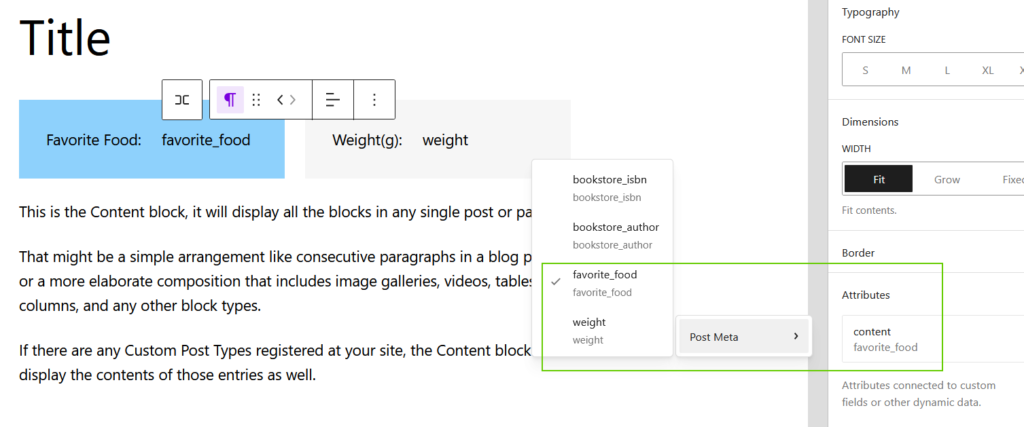
We can see the following is the resulting pet template. Notice that there’s a Block Bindings user interface at the right sidebar to select a different data sources that are displayed in the editor. This UI improvement is added on WP 6.9. Here we can easily switch between sources, as well as bind and unbind attributes with a single click.
Display the meta field on a local post:
As we have seen, by adding the meta fields in the template, their corresponding values will show up globally across the designated post type. But, if we want to display the meta field in a selected post, we must insert the JSON notation object into the preferred post’s block markup. In this example, I place it under a certain pet post.
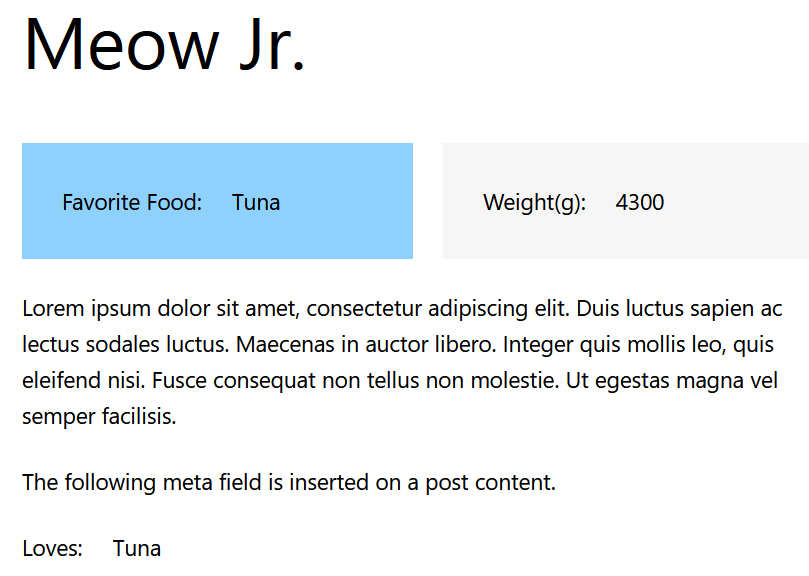
I can’t wait to see this Block Bindings API mature, and we get to have a native WordPress UI integrated with the editor to display dynamic fields in the not so distant future.
References
New Feature: The Block Bindings API
Introducing Block Bindings, part 1: connecting custom fields
Display custom data with the Block Bindings API
Share your thoughts